Not another Clio. Your firm’s own system.

  • Pay once, yours for life
  • No monthly fee per person
  • Hosted for you, secure and backed up

Made to fit. We change any screen, field, step or report to match how your firm works.

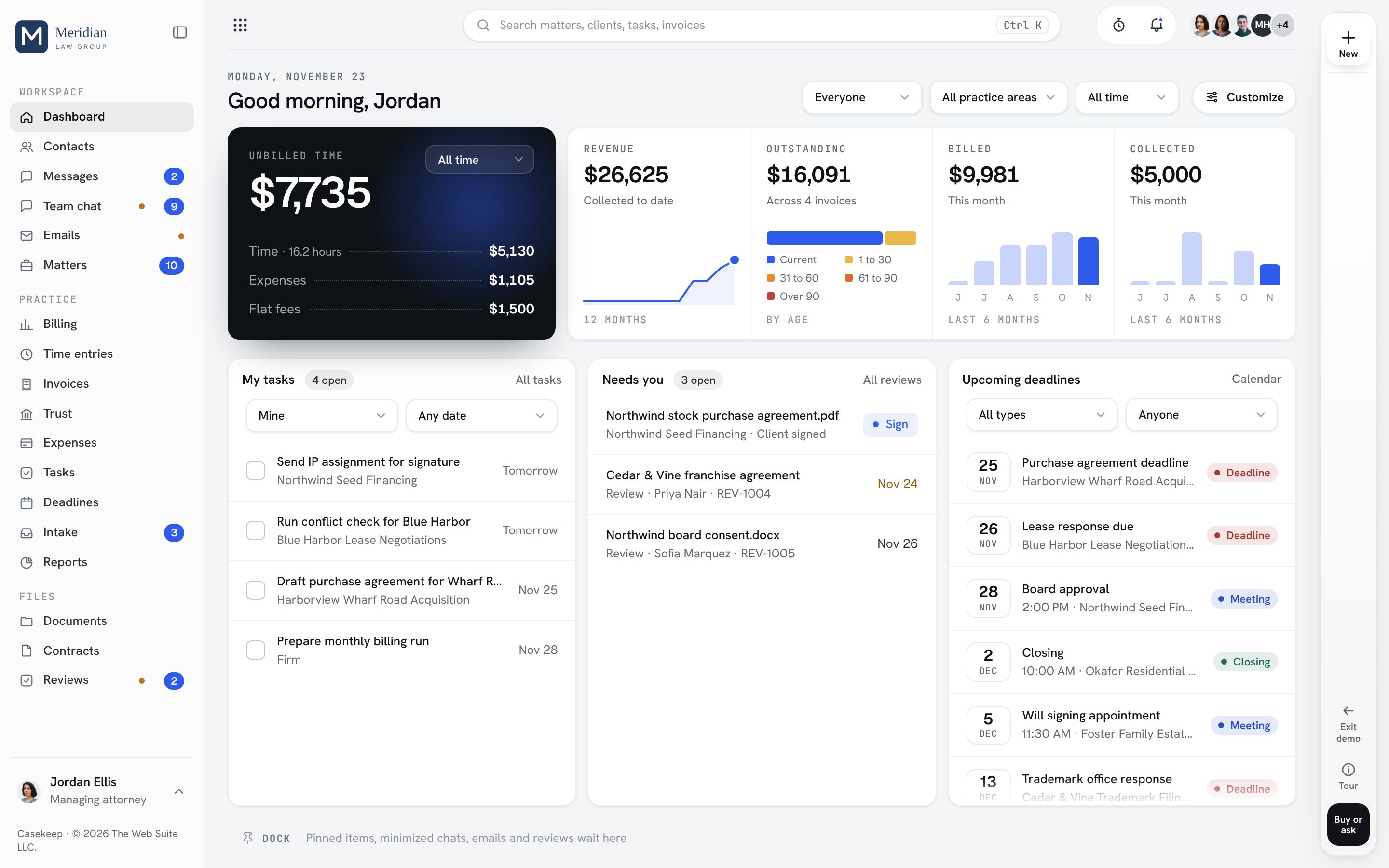
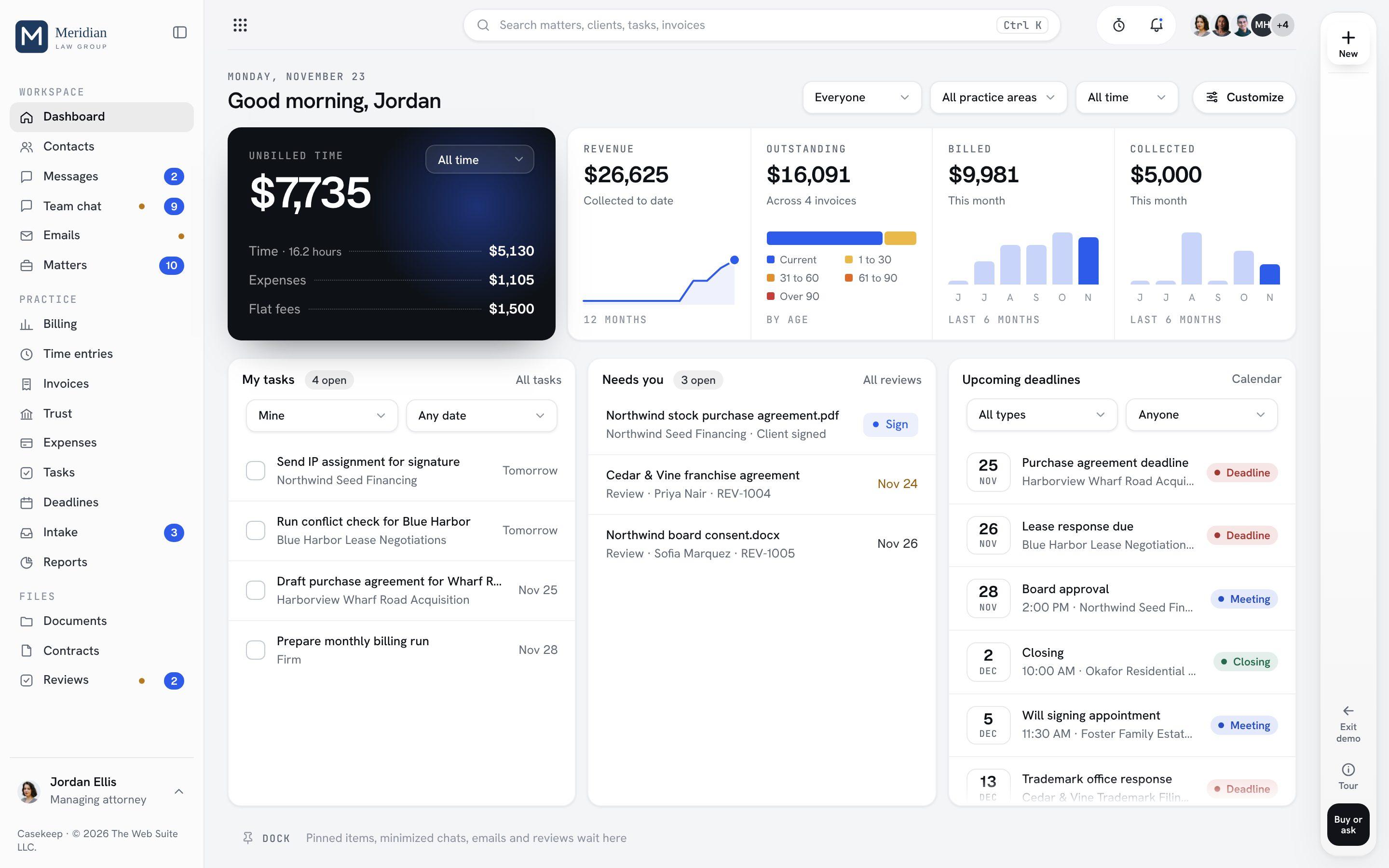
The Casekeep dashboard: money ready to bill, revenue, tasks, deadlines and recent activity
ExampleA 3-person firm
Paid once
  • Casekeep, 1 seat$699
  • 2 extra seats at $99$198
Paid once$897
How you payOne-time fee

The same three people on Clio’s entry plan: $1,764 a year, every year, at the listed starting price.

Hosting with us adds $39 a month for the whole firm, after a $79 setup.

The demo

Click through the real thing.

This is the base system, running on a sample firm. Every part of it can be customized to fit how your firm works.

Open the live demo
  1. Try 01Start a timer from the top bar, then log it to a matter.
  2. Try 02Run a conflict check on a new name.
  3. Try 03In Settings, open Logo and branding and switch your invoices between three styles.
  4. Try 04Open Reports and run A/R aging.
Why own it

Rented software charges every seat, every month.

  1. 01

    The bill grows with the firm

    Every new associate or paralegal adds another monthly seat, and the vendor sets next year’s price.

  2. 02

    Your records live on their servers

    Stop paying and you're left with an export and a migration.

  3. 03

    You pay for the whole catalog

    Plans bundle features a small firm never opens, and the one you need sits a tier higher.

Cost for a 3 person firm
The same 3 peoplePer seat a month1 year3 years
Clio Entry planlisted starting price; higher plans are quoted$49$1,764$5,292
MyCase Basicbilled annually$50$1,800$5,400
MyCase Pro$1,200 a year, billed annually$100$3,600$10,800
PracticePanther Essentialbilled annually$69$2,484$7,452
PracticePanther Businessbilled annually$89$3,204$9,612
Casekeep$699 plus 2 seats at $99, paid onceNone$897$897

The license is the system itself: the code, ready for you or your developer to install. Installing it, hosting, connecting your accounts, moving your data in and customizing are separate. List prices from each vendor’s site, October 2026, before add-ons and taxes: clio.com/pricing, mycase.com/pricing, practicepanther.com/pricing. Clio, MyCase and PracticePanther are trademarks of their owners; we are not affiliated.

What's included

What a small firm runs on, in one place.

Matters and clients

  • Matters with their full history in date order
  • Clients and contacts, linked to every matter

Time and billing

  • Timers in the top bar, each on a matter, one running at a time
  • Time entries and expenses

Trust and retainers

  • Trust (IOLTA) ledger per client and matter, never below zero
  • Pay invoices from trust; one matter never pays another's bill

Tasks and deadlines

  • Tasks as a list, a board or a calendar
  • Deadlines tied to each matter

Documents and email

  • Documents filed to the matter they belong to
  • Document templates

Reports and dashboard

  • 79 reports, 6 of them for trust: revenue, A/R aging, work in progress, collections, profitability
  • Dashboard with graphs you can arrange

Team, access and safety

  • Four roles: admin, attorney, billing and staff
  • Change a single ability for one person
  • Attorneys and staff see only their own matters
See everything that's included

Matters and clients

  • Matters with their full history in date order
  • Clients and contacts, linked to every matter
  • Conflict check before you take a matter on
  • Intake pipeline, from first call to engagement letter
  • Turn a lead into a client and its first matter

Time and billing

  • Timers in the top bar, each on a matter, one running at a time
  • Time entries and expenses
  • Invoices in three styles, with your logo and color
  • Payment plans and batch billing
  • Payments by check, ACH, wire, card or cash

Trust and retainers

  • Trust (IOLTA) ledger per client and matter, never below zero
  • Pay invoices from trust; one matter never pays another's bill
  • Mistakes fixed by a reversing entry, never edited away
  • Bank reconciliation, trust reports and a low balance list
  • Entered by hand; it never moves money in your trust account

Tasks and deadlines

  • Tasks as a list, a board or a calendar
  • Deadlines tied to each matter
  • Your own tasks due today, counted in the menu
  • Comment threads on tasks and intake leads

Documents and email

  • Documents filed to the matter they belong to
  • Document templates
  • Engagement letters tracked from not sent to signed
  • Drop in an email as .eml, .msg or PDF and file it to the client and matter
  • Coming soon: the Contract review add-on, every contract read against your firm's playbook

Reports and dashboard

  • 79 reports, 6 of them for trust: revenue, A/R aging, work in progress, collections, profitability
  • Dashboard with graphs you can arrange
  • Operating costs, so you see what the firm costs to run
  • Export any report to CSV, or print it

Team and access

  • Four roles: admin, attorney, billing and staff
  • Change a single ability for one person
  • Attorneys and staff see only their own matters
  • Audit log of who changed what

Backups and your data

  • Deletion log, with restore
  • A full copy of your data as one file, which restores on a single computer
  • CSV import and export of clients, contacts and matters, plus time import

Client portal

  • Clients sign in to see their matters, invoices and shared documents, and message you
  • E-signature with a signing certificate for each document

Where your documents live

Files go into a folder for each matter in your firm's own Google Drive, included in the price. Calendar for deadlines, Meet links on meetings, Gmail on each client and Contacts kept in step are add-ons, all on the same setup. Casekeep keeps the link, never a copy.

We can add

OneDrive, Dropbox or another file tool in place of Google Drive.

Taking payments

You create, send and track invoices and record every payment, but the system doesn't charge cards itself. Put your LawPay or Stripe payment link on your invoices.

We can add

A LawPay connection so clients pay online and each payment records itself in the system.

Trust accounting is kept by hand

The system records deposits and payments from trust but never moves money. You reconcile it against your bank statement under your state bar's rules. It's a record keeping tool, not legal or accounting advice.

We can add

A LawPay setup so retainers are paid online straight into your trust account.

Security and privacy

Your data, protected at every step

Every line here is built into the copy you download, not added later.

Read the license terms
  • Every record locked to the right people

    The database itself checks who may see each record, not only the screen.

  • A history nobody can change

    Every change is recorded with who made it. The database locks it, even against an admin.

  • Nothing lost by mistake

    Deleted records wait 30 days in the Trash, and every import can be undone.

  • Trust entries are never edited or deleted

    A mistake is fixed with a reversing entry, so every change stays on the record.

  • Clients see only their own

    The portal shows each client their own invoices, documents and messages, nothing else.

  • A signed license key

    Your copy opens only with a valid key, and your own database checks every seat.

  • Shipped protected

    Scrambled code, plus security settings for Vercel, Netlify, Cloudflare Pages and Apache.

  • Built to respect GDPR and CCPA rights

    Download or delete what we hold about you, any time.

    Details
  • Never sold, never used to train AI

    In writing, in our Data Processing Addendum.

    Details
Setup and services

Use it as is, or have us make it yours.

With hosting with us, we put it online and run it for you, so there's nothing to install. Then choose how much more you want: we move your firm in, look after it, or change it to fit how your firm works.

Hosting with us
$39a month, after a $79 one-time setup

We run it for you

We put it online for you, then keep it online, secure and backed up. Month to month.

Or on your own host
Freeyou set it up, no hosting

Already have a host?

Choose it before checkout. You put it online yourself with our step by step guide. It's still the protected copy.

Move-In package
Quotedby firm size

We move your firm in

Set up for you, your clients and matters imported from one export file with a written count check, one live training session and the handover.

Care
From $99a month, plus hosting

We look after it

Updates, fixes and small changes, plus new versions installed for you. Cancel any time.

Customize
Quotedper job

We tailor it to your firm

New fields and screens, or connections to LawPay, OneDrive or any tool with an API.

New versions
$29or $79 installed, when we host it

Stay current

Your copy keeps working as it is. Move to the latest version when you want; Care includes it.

Hosting with us is $39 a month, month to month, and you can choose your own host instead before checkout. Care plans are added to hosting with us, from $99 a month, and are chosen after you press Buy. Move-In and custom changes are quoted in writing first, on top of the $699 license.

Buy and choose your setup
Add-ons

Add more when your firm needs it.

Google Drive comes with every copy. Add any of these whenever you’re ready, and we set it up for you.

Office suitePrice on request

Your firm's Google or Microsoft 365, inside Casekeep

  • Gmail or Outlook mail on the client and its matter
  • See which colleague is replying to a client, live
  • Your reply waits while a colleague answers, so the client never gets two
  • Pin the email window and keep working on any page
  • Read receipts, notes on a conversation and templates
  • Deadlines on your Google or Outlook calendar
  • A Meet or Teams link on every meeting
  • Clients in your Google or Outlook contacts
  • OneDrive and SharePoint, or Dropbox, in place of the Google Drive that comes with Casekeep
  • Out of office set for you from approved time off, with Officekeep
Set it up for me
TrademarksPrice on request

Casekeep Trademarks, for firms with a trademark docket

  • Every mark by client, word marks and designs told apart
  • Filing, office action, Statement of Use, Section 8 and renewal dates worked out for you
  • Reminders from three months ahead, and email templates for every USPTO step
  • Trademark intake form, on its own or with Casekeep's
  • Automatic USPTO updates every day when we host it
Set it up for me
OfficekeepPrice on request

The office side of your firm

  • Team board, people and an org chart
  • Time off, requested and approved
  • Team chat, with Slack or Google Chat
  • Operating costs and vendors
Set it up for me
ReviewsPrice on request

Document reviews

  • Send any document to a colleague, with a due date and priority
  • Approve it or ask for changes
  • Compare versions in one redline
  • Voice notes on a review's comments
Set it up for me
Text messagesPrice on request

Text clients from Casekeep

  • Texts and replies in the same conversation
  • Appointment and payment reminders
  • Through your firm's own texting provider
  • A client who texts STOP isn't texted again
Set it up for me
Buy

Casekeep

You get
  • The complete system: every feature in the demo
  • The code, ready for you or your developer to install
  • Your data, yours to export any time
  • Sign-in, four roles and an audit log once shared
$699 one-timeLifetime license1 seat included
Extra seats, paid once$99 each
A firm of 10 to 20 people$1590
Hosting with us, month to month$39/mo*

More than 20 people? Contact us.

*Plus a $79 one-time setup fee. Or choose your own host.

A lifetime license for your own firm, with every detail in the License Terms.

Questions

Questions before you buy.

Free guides: the intake playbook and moving off Clio.

What's not included in the price?

The license is the system itself: the code, ready for you or your developer to install. Installing it, hosting, connecting your accounts, moving your data in and customizing are separate.

Is there a Clio alternative without a monthly fee for every user?

Yes. Casekeep is a lifetime license with one payment, and no monthly fee per person: $699 with one seat, and $99 for each extra seat, a firm of 10 to 20 people pays $1590 in total, and a firm of more than 20 contacts us for its price. We host it for you: $39 a month for the whole firm, month to month, with a $79 one-time setup.

Can I turn it into an app on my phone?

Yes. Turn it into an app on your iPhone or Android phone: it sits on your home screen with its own icon, with nothing to download from an app store. Open your Casekeep address on your phone and add it to your home screen. With My firm, shared, every phone and computer shows the same matters, time and invoices.

Can we run it on our own accounts?

Yes. We host Casekeep for you by default: online, secure and backed up, for $39 a month, month to month. Already have a host? Choose your firm's own accounts before checkout and you or your developer install it with our step by step guide, free, with no hosting. Our setup comes with hosting with us. It's still the protected copy. If you leave our hosting later, you get a full handover within 14 days.

Is my client data safe?

We run the system and its database for you with SSL and backups, and you can export everything any time. The shared setup uses sign-in, four roles, matter level permissions enforced by the database, and an audit log. You control who has access. If your firm hosts it on its own accounts, your data sits in your own database account and backups come from your database provider (Supabase backs up daily on its paid plans). No system on the internet can be promised to be completely secure, and you remain responsible for your own professional and regulatory requirements.

How many users?

The price includes one seat, meaning one person who signs in. Each extra seat is $99, paid once. A three person firm pays $699 plus two seats, $897 in total. A firm of 10 to 20 people pays $1590 in total. More than 20 people? Contact us and we set up your firm. When you click Buy, choose how many people will sign in and the extra seats are added before you pay.

Can you customize it for my firm?

Yes, it's fully customizable through our Customize service. The code is delivered protected, so changes come from us. We tailor it for an added charge: your own fields and screens, the way your firm runs intake or billing, your branding, or connections like Stripe, LawPay, QuickBooks, Outlook and OneDrive. We quote the work before we start, and it isn't included in the purchase price. We can change it any time, even months after you buy, and this is separate from upgrading to a new version. For ongoing changes, Care Plus and Care Max include up to 2 or 5 hours of work a month.

Can we bring our data over from Clio or another system?

The system imports clients, contacts, matters and time entries from CSV files, which most practice software can export. You match the columns, check a preview, then import. Rows with problems are skipped and listed, and rows already in the system aren't imported again. You can also export your clients, contacts and matters to CSV at any time, so your data is never locked in. Want us to do it? Our Move-In package, for firms we host, priced by firm size and quoted first, installs the system, imports your clients and matters with a written count check that every record arrived, trains your team in one live session and hands it over. Your current system keeps running until you switch.

What does hosting include, and who owns the data?

For $39 a month, we run the system and its database for you, with SSL and backups. Hosting comes with a $79 one-time setup, so we put it online for you. It's month to month, with no minimum term. Your firm owns its data, and you can export it any time. If you later want to run it yourself, we hand over a full export and a copy that runs on your own accounts within 14 days.

What happens to our data if we leave?

Your data is yours, and you can export it any time. When you leave, we hand over within 14 days of your written request: a full export and a copy that runs on your own accounts. 30 days after the handover is completed, we delete your data from our hosting, and deleted data can't be recovered. Lawyers usually must keep trust account records for several years, so keep the trust ledgers and reconciliations from your export.

Can we have Care on our own accounts?

Yes, when Casekeep runs on your own Vercel, GitHub and Supabase accounts, the exact setup we use, and you give us access. Otherwise Care comes with hosting with us.

How do new versions work?

New versions come out as we improve the system, and each one is numbered automatically. Your copy stays on the version you buy and keeps working as it is, so you never have to upgrade. To move to the latest version, come to us: $29 with instructions to install it yourself, or, when we host it for you, $79 and we install it. With a Care plan, new versions are included and we install them.

Who at The Web Suite can see our data?

We host it, so our team can reach the database to keep it running, and looks at your data only when that's needed or when you ask for help. If your firm runs it on its own accounts, we can't see it: we only see what you share with us when you ask for help. We keep client information confidential.
Every system we build is a Keep.

What could your firm stop paying for?

You start with the base system, and it grows with your firm. Whenever you need something new, a screen, a report or a connection to another tool, we add it.

Book a free call